


SpaceHobo
Registered
- 10 Apr 2023
- 8
- 9
After completing JS & React courses, I created my first open-source project.
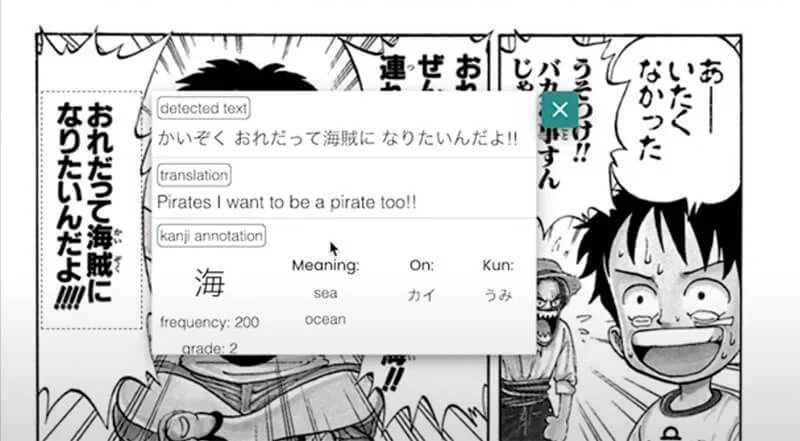
For some years, I have been casually learning the Japanese language, and in my studies, I heavily preferred the immersive approach. But the Japanese language (Chinese & partially Korean) has a pretty high bar for casual reading because not only does one have to learn two alphabets, but one also memorizes at least a few hundred kanji.
The regular need to switch from reading light text/manga (or watching youtube, dorama etc.) to some dictionary tab to find this unknown or forgotten kanji was ruining the experience.
I discovered some excellent resources like Yomichan (I highly recommend checking it out), which recognizes text under the mouse cursor and provides translation and annotation from given dictionaries.
Unfortunately, none of the free options used OCR to check any picture, be it a manga panel or subtitles in the paused video, right from the same tab. So I decided to make one myself!
For some years, I have been casually learning the Japanese language, and in my studies, I heavily preferred the immersive approach. But the Japanese language (Chinese & partially Korean) has a pretty high bar for casual reading because not only does one have to learn two alphabets, but one also memorizes at least a few hundred kanji.
The regular need to switch from reading light text/manga (or watching youtube, dorama etc.) to some dictionary tab to find this unknown or forgotten kanji was ruining the experience.
I discovered some excellent resources like Yomichan (I highly recommend checking it out), which recognizes text under the mouse cursor and provides translation and annotation from given dictionaries.
Unfortunately, none of the free options used OCR to check any picture, be it a manga panel or subtitles in the paused video, right from the same tab. So I decided to make one myself!


 I'll download now!


