Free text recognition and translation Chrome extension for Japanese language learners

SpaceHobo

Registered
Joined
10 Apr 2023
Messages
8
Reaction score
9
After completing JS & React courses, I created my first open-source project.
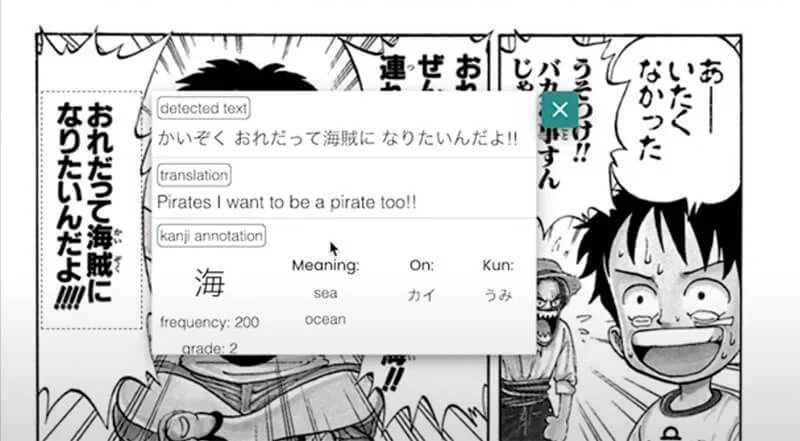
Screen-Shot-2023-04-09-at-22.38.01.webp

For some years, I have been casually learning the Japanese language, and in my studies, I heavily preferred the immersive approach. But the Japanese language (Chinese & partially Korean) has a pretty high bar for casual reading because not only does one have to learn two alphabets, but one also memorizes at least a few hundred kanji.

The regular need to switch from reading light text/manga (or watching youtube, dorama etc.) to some dictionary tab to find this unknown or forgotten kanji was ruining the experience.

I discovered some excellent resources like Yomichan (I highly recommend checking it out), which recognizes text under the mouse cursor and provides translation and annotation from given dictionaries.

Unfortunately, none of the free options used OCR to check any picture, be it a manga panel or subtitles in the paused video, right from the same tab. So I decided to make one myself!

 
Have you posted about this last year? Maybe on another forum? I remember somebody trying to do this last year and I tried out their prototype. It worked ok for some images but not well on vertical writing.
 
Have you posted about this last year? Maybe on another forum? I remember somebody trying to do this last year and I tried out their prototype. It worked ok for some images but not well on vertical writing.
Hi! That was not me for sure, wrote my prototype in last two month :)
 
I'm thankful for this :) I'm definitely going to install it and give it a try!
I tried to use other extensions like yomichan and such, but they didn't really give me any appealing features in my opinion because anything that could be selected could just be put into Jisho as well as DeepL for an easy and typically accurate translation (although I wish I could change the voice of DeepL on my computer...)
With this, whenever I discover a new word or kanji character that prevents me from finishing a sentence, maybe the OCR will save the day and allow me to familiarize myself with the new content in order to remember next time. The OCR feature on DeepL's desktop app usually doesn't work correctly :(

Another thing that prevents me from memorizing words is that I like to hear it when I learn it, so it can be visually and auditorily memorized and linked, which (personally) usually leads to better memorization of the term and easy recall. The DeepL app on my phone allows me to use the Samsung TTS voices, which sound incredibly realistic as well as having typically correct intonation and pitch accent (it sounds exactly like Saiki Kusuo, honestly!). On the desktop app, it just uses the default Microsoft Ayumi, which sounds absolutely horrible... I wish I could at least change it to Haruka (even though that's only a minor improvement), but there's no way to change the voice at all.

On the web, I've noticed that certain sites/extensions use different voices. I wrote this entire backstory to make a request: Would you be able to add support for choosing a specific voice synthesis engine (or at least multiple decent sounding ones)? For example, I noticed on a site called Lingopie, there was a half decent TTS voice on it, which is apparently called "Mizuki". I believe that it's important to have at least a fairly decent text to speech to introduce the word to make it easier to catch in real life. There were many times that I heard a word but didn't know that I knew it, simply because I never got to listen to it when I learned it.
I know that TTS voices aren't always reliable and can't be trusted for 100% correct pronunciation, but I really think it does help at first to hear the word at least remotely how it would be spoken in real life (and at best, exactly how it would be spoken in real life), so I hope you'll consider this feature if it's not there already!

Oh yeah, could you send the link to it as well so I can use it? I can't seem to find it or the name of it here...
 
I'm thankful for this :) I'm definitely going to install it and give it a try!
I tried to use other extensions like yomichan and such, but they didn't really give me any appealing features in my opinion because anything that could be selected could just be put into Jisho as well as DeepL for an easy and typically accurate translation (although I wish I could change the voice of DeepL on my computer...)
With this, whenever I discover a new word or kanji character that prevents me from finishing a sentence, maybe the OCR will save the day and allow me to familiarize myself with the new content in order to remember next time. The OCR feature on DeepL's desktop app usually doesn't work correctly :(

Another thing that prevents me from memorizing words is that I like to hear it when I learn it, so it can be visually and auditorily memorized and linked, which (personally) usually leads to better memorization of the term and easy recall. The DeepL app on my phone allows me to use the Samsung TTS voices, which sound incredibly realistic as well as having typically correct intonation and pitch accent (it sounds exactly like Saiki Kusuo, honestly!). On the desktop app, it just uses the default Microsoft Ayumi, which sounds absolutely horrible... I wish I could at least change it to Haruka (even though that's only a minor improvement), but there's no way to change the voice at all.

On the web, I've noticed that certain sites/extensions use different voices. I wrote this entire backstory to make a request: Would you be able to add support for choosing a specific voice synthesis engine (or at least multiple decent sounding ones)? For example, I noticed on a site called Lingopie, there was a half decent TTS voice on it, which is apparently called "Mizuki". I believe that it's important to have at least a fairly decent text to speech to introduce the word to make it easier to catch in real life. There were many times that I heard a word but didn't know that I knew it, simply because I never got to listen to it when I learned it.
I know that TTS voices aren't always reliable and can't be trusted for 100% correct pronunciation, but I really think it does help at first to hear the word at least remotely how it would be spoken in real life (and at best, exactly how it would be spoken in real life), so I hope you'll consider this feature if it's not there already!

Oh yeah, could you send the link to it as well so I can use it? I can't seem to find it or the name of it here...
Hi! Thank for your reply :)
At the moment I'm focused on fixing crucial bugs and updating main app logic. For the next step Anki-connect integration seems like a good investment, but as I remember Jotoba API (which ScanLingua use for kanji annotation) do have some voice data that is probably not hard to include in crop results, so I'll definitely consider your thoughts.
 
Hi! Thank for your reply :)
At the moment I'm focused on fixing crucial bugs and updating main app logic. For the next step Anki-connect integration seems like a good investment, but as I remember Jotoba API (which ScanLingua use for kanji annotation) do have some voice data that is probably not hard to include in crop results, so I'll definitely consider your thoughts.
Thank you! Is it available now, or is it closed off to the public for now I'm assuming?
Edit: nevermind, just realized it's ScanLingua (thanks to mdchachiさん) 😅 I'll download now!
Edit 2: Didn't realize what I had to do to get an API key 🥺
 
Last edited:
Thank you! Is it available now, or is it closed off to the public for now I'm assuming?
Edit: nevermind, just realized it's ScanLingua (thanks to mdchachiさん) 😅 I'll download now!
Edit 2: Didn't realize what I had to do to get an API key 🥺
Yeah, unfortunately it was the only way to keep app free
 
I tried to follow all the steps including generating an API key but it doesn't seem to work for me.
View attachment 102191
Well, that's the hard part.
Try this one - AIzaSyA_y_A34pjc_sKbkc4D7-kk6n31ok6xCVs (and refresh the page after pasting it)
It is only for you to test, I'll disable it in few hours.
Make sure that you enable billing and also enabled vision and translation APIs for your key in project.
(example link to docs for vision enable - Cloud Vision setup and cleanup | Cloud Vision API | Google Cloud)
 
Well, that's the hard part.
Try this one - AIzaSyA_y_A34pjc_sKbkc4D7-kk6n31ok6xCVs (and refresh the page after pasting it)
It is only for you to test, I'll disable it in few hours.
Make sure that you enable billing and also enabled vision and translation APIs for your key in project.
(example link to docs for vision enable - Cloud Vision setup and cleanup | Cloud Vision API | Google Cloud)
I get the same error with your key. Do I need to do something in my Google account for that key too?
 
I put it in
View attachment 102194
Then I do the ctrl+S to draw a capture box and then it gives me that error.

View attachment 102195
Do you click submit button after you put key in? (so the "key saved, try to crop" text appears)
If yes, then I'm not sure what preventing key to work, but it seems to be something local on your browser/pc.
If you want you can hit me on telegram @SpaceHobo and we'll try to figure it out.
 
Do you click submit button after you put key in? (so the "key saved, try to crop" text appears)
If yes, then I'm not sure what preventing key to work, but it seems to be something local on your browser/pc.
If you want you can hit me on telegram @SpaceHobo and we'll try to figure it out.
Submit means the checkmark? If so, yes, I press the checkmark and it gives the "key saved" message.
 
Submit means the checkmark? If so, yes, I press the checkmark and it gives the "key saved" message.
Well them as I said I'm not sure, but it seems local (for example hotkey don't set automatically on linux systems).
Test key disabled, I'll try to think what else I can advise in your case.
 
The OP, the demonstration of your application in your initial post shows that it misunderstood the furigana かいぞく as a single vertical line right to the correct first line.

かいぞく おれだって海賊になりたいんだよ!! (not おれだって海賊(かいぞく)になりたいんだよ!!)
Pirates I want to be a pirate, too!! (not just "I want to be a pirate, too!!")

This occurs on other lines like バカな事(こと)すんじゃ or 連(つ)れて, too? If so, this can be a fatal fault of your app.
 
The OP, the demonstration of your application in your initial post shows that it misunderstood the furigana かいぞく as a single vertical line right to the correct first line.

かいぞく おれだって海賊になりたいんだよ!! (not おれだって海賊(かいぞく)になりたいんだよ!!)
Pirates I want to be a pirate, too!! (not just "I want to be a pirate, too!!")

This occurs on other lines like バカな事(こと)すんじゃ or 連(つ)れて, too? If so, this can be a fatal fault of your app.
Hi, that's a good point.
The app main concept is in capturing relatively small tab parts or even single kanji's rather than translating big parts of text so you can just leave unneeded furigana out of the crop box.
The OCR (recognition) itself relies on Google Vision API, and as it developing further we will definitely see some improvements there.
 
Back
Top Bottom