FAQ How to contact members (Direct Messages)

thomas

Unswerving cyclist
Admin
Joined
14 Mar 2002
Messages
21,054
Reaction score
18,910
Conversations, aka "Private Conversations" (PCs), are private threads between two or more members. The member initiating a conversation can decide who to contact and how many other members to include. The number of PCs and other members to include depends on your User Group.


⚠️ Please see Post #17 below for the latest updates on Direct Messaging. ⚠️


Please note that there is no separate Inbox and Outbox. All messages relating to one specific conversation are in a single thread, just like the threads in the forum.

How to start Private Conversations?
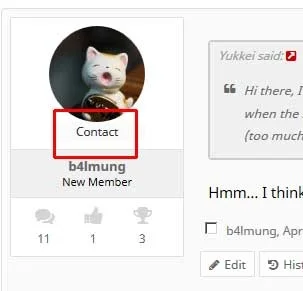
  • In thread view, click the "Contact" link under a member's avatar. This will open a small dialogue field that lets you start a private thread.


Private-Conversations01.webp


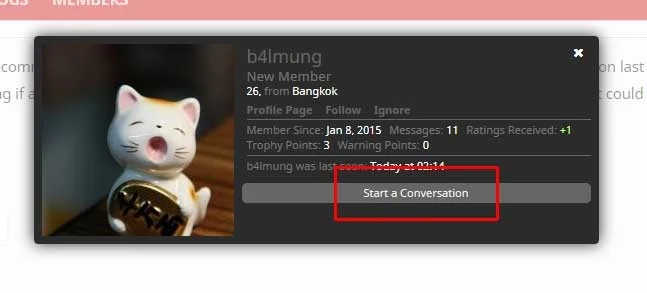
  • In any other view, clicking a member's User Name will open their Member Card (see below). Click the "Start a Conversation" link to initiate a PC.


Private-Conversations02.webp
 
Last edited:
Did you click your user name, perhaps? If so, it's because there is no reason to start a private conversation with yourself, I believe.
 
Also, registered members with less than five posts cannot start PCs. They can however receive conversation requests.
 
I have at least 30 posts. I didn't try to send private message to myself. Still don't see the button. Maybe 5 threads?
 
@Sultan , I see what happened. For some reason your automatic promotion has failed. I have just run the process manually and you should now be able to start PCs. My apologies!
 
I don't seem to be able to start a conversation. I successfully did it once in the past, but don't seem to be able to do it now using the instructions in this thread. If a moderator could take a look at this, at your convenience, I would appreciate it. Thanks.
 
@lincstreff , very sorry! For the same unknown reason as above your automatic promotion failed. You should now be able to start PCs, please contact me if there are any issues.
 
Just figured out that I can't start a conversation with anybody. Can somebody help me with that automatic promotion thing?
 
@hiverloon , I have promoted you to "Sempai" manually. Are you still unable to start PCs?
 
@hiverloon , I have promoted you to "Sempai" manually. Are you still unable to start PCs?
Thanks it works now although I can only start conversation from the person's profile page, not from the pop up box when you click on their username or avatar (the "start a conversation" button is still not present). Anyway it's fine as long as the it solves the problem.
 
Having issues also. Is there a timeframe, or is it just after 5 posts?

Yes, once you are automatically upgraded to "Kouhai" (five-post limit), you will be able to contact other members by Private Conversation (soon to be renamed DM). Sadly, we cannot allow "Registered" users to use PCs due to flagrant spamming activities.
 
In XF 2.3.x, Private Conversations were renamed to Direct Messages.

So, to clarify the terminology, Private Messages (PM) or Private Conversations (PC) are a thing of the past.

How to DM other members:
  • Registered members cannot directly contact other members. In the past, DMs were heavily abused to send spam. If you are registered and need to contact someone urgently, please get in touch with us via the Contact form or leave a message on a team member's profile page.
  • To DM other members, you must be a member of the Kouhai user group. You will be automatically promoted to Kouhai once you have posted five messages to the forum. Kouhai can send DMs to a maximum of five recipients at a time and edit their messages for 60 minutes.
  • Members of the Sempai user group (requiring 100 posts) can DM up to ten members and edit their messages for up to 240 minutes.

You can send DMs by clicking a member's user name:

Direct Messages (DM)
 
Back
Top Bottom