Help with translation?

Claire

後輩
Joined
8 Feb 2006
Messages
3
Reaction score
0
Hiya, someone directed me to this site because I'm having problems with a program on my computer and all the error messages are coming up in Japanese, so I have no idea what to do.

Basically a long time ago I installed a program called RPG Maker Postality Knights Edition. It was an unofficial English-translated version of a Japanese program called RPG Maker XP - you may have heard of it. Anyways, there has recently been released an official and legal English version of this program, so I've downloaded it. However, in order to run, this program needs to install this file called RGSS-RTP, but it won't install on my computer because it says one already exists.

Aha, I thought, that must be the one I got with the Postality Knights Edition. So I uninstalled it. However, the RGSS-RTP won't uninstall, and since all the error messages are in Japanese, I have no idea what to do about it, and until I figure it out, the £30 odd I've spent on RPG Maker XP is completely wasted.

Any translations/thoughts would be much appreciated, as I really am at my wits end.
 

Attachments

  • error.webp
    error.webp
    11.8 KB · Views: 181
  • error1.webp
    error1.webp
    17.5 KB · Views: 533
  • error2.webp
    error2.webp
    11 KB · Views: 190
  • error3.webp
    error3.webp
    16.7 KB · Views: 233
  • error4.webp
    error4.webp
    17.3 KB · Views: 253
Here are the other error messages.
 

Attachments

  • error5.webp
    error5.webp
    18.4 KB · Views: 521
  • error6.webp
    error6.webp
    10.3 KB · Views: 495
  • error7.webp
    error7.webp
    16.3 KB · Views: 260
1st:
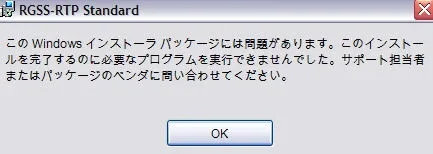
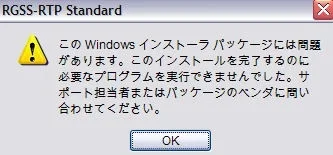
There is a problem in this Windows installer package. A required programm could not be executed (or something like this). [something about support]

2nd:
First option: Repair, second option: Delete

3rd: same as 1st

4th:
Installation completed. Please click "Close". (not much of a choice there)

5th:
(only a guess) The network resource choosen could not be used at this time.


Don't have much time right now but perhaps this helps a little. Maybe someone could do a better translation.


Cheers, Jan
 
I hope this helps! Below are translations of the error messages in the following order: starting with your first post, the pictures as seen from left to right, top to bottom, following with your second post in the same order.

Keep us posted if you continue to have problems!

FIRST POST
(1)There is a problem in this Windows installer package. It was not possible to run a necessary program to complete this installation. Please contact your support personel or the package vendor.
Button:OK


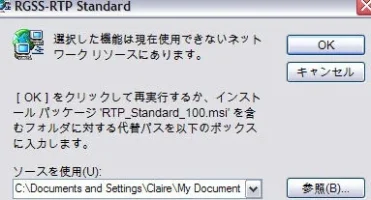
(2)The selected function is in a network resource that can not be used at this time.
Click [OK] to retry or, type the path of the folder containing the installation package 'RTP_Standard_100.msi in the box below.
Buttons: (top)OK / (middle) Cancel / (bottom) Search

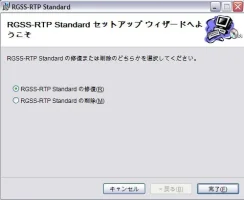
(3)Welcome to the RGSS-RTP Standard Setup Wizard
Please select either to restore or delete RGSS-RTP Standard.
Restore RGSS-RTP Standard
Delete RGSS-RTP Standard
Buttons: (left)Cancel / (middle, not selectable)Return / (right)Finish

(4)Same error message as (1)

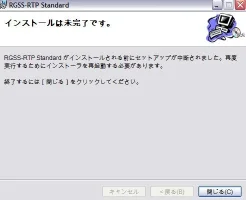
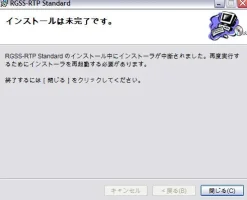
(5)Installation is Incomplete.
Setup was interrupted before installation of RGSS-RTP Standard could be completed. To try installing again, you need to restart the installer.
To finish, please click the [Close] button.
Buttons (left, not selectable)Cancel / (Middle, not selectable)Return / (Right) Close

SECOND POST

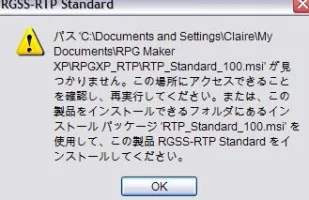
(1)The path c:\Documents and Settings\Claire\My Documents\RPG Maker XP\RPGXP_RTP\RTP_Standard_100.msi could not be found. Please confirm that access to this location is possible and retry. Otherwise, you may install this product's RGSS-RTP Standard by using the installation package RTP_Standard_100.msi in a folder you can install this product into.
Button: OK

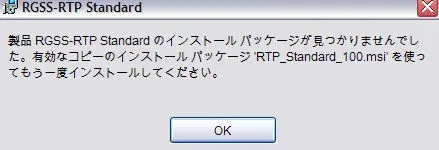
(2)The product RGSS-RTP Standard installation package could not be found. Please install again using an effective/valid copy of the installation package RTP_Standard_100.msi.
Button: OK

(3)Same as (5) from your first post.
 
Thanks, this helps a lot. I really appreciate it.
now I just have to figure out how to get rid of the damn thing.

EDIT: which is turning out to be impossible. If anyone has any ideas, I'm all ears.
 
Back
Top Bottom