Having problems with your PC/Laptop Ill try and help!

Zaff

先輩
Joined
3 Apr 2007
Messages
174
Reaction score
10
If anybody has any problems software or hardware related with their PC or Laptop, I shall do my best to help them out in here.

I have been working with computers several years have had industry experience in building and fixing them. I also have qualifications in the said field and am currently an undergrad in Games programming.

Theres not much I can physically do from here, but I can help by walking you through step by step on what to do.

Ill check this thread daily and with some luck Ill save you a few yen/bucks/pound instead of buying new, or paying people to fix it for you.
 
OK, let's give it a try!

I bought a notebook computer last week at the local Compumart, but unfortunately it had Vista as its OP, so I went ahead and installed XP instead.

That much is fine, but there is one driver that I can't get to work / can't seem to find the right one. It's for the wireless LAN. Since I don't use a wireless LAN, I decided that it wasn't a big deal, but if you can help, that would be great. I hate having those yellow exclamation marks in the Device Manager.

The computer is an NEC LaVie LL370/JD and the book says this about the wireless: "Triple Wireless LAN. (IEEE802.11a/b/g compliant)"

I found a driver that I think is supposed to work, although I can't remember the site I got it from off hand.

I'll try to give you more information when I open up that particular computer again.
 
OK, let's give it a try!
I bought a notebook computer last week at the local Compumart, but unfortunately it had Vista as its OP, so I went ahead and installed XP instead.
That much is fine, but there is one driver that I can't get to work / can't seem to find the right one. It's for the wireless LAN. Since I don't use a wireless LAN, I decided that it wasn't a big deal, but if you can help, that would be great. I hate having those yellow exclamation marks in the Device Manager.
The computer is an NEC LaVie LL370/JD and the book says this about the wireless: "Triple Wireless LAN. (IEEE802.11a/b/g compliant)"
I found a driver that I think is supposed to work, although I can't remember the site I got it from off hand.
I'll try to give you more information when I open up that particular computer again.
This is the website for driver downloads that NEC directs you to for their Asian computers. NEC LAVIE公式サイト > サービス&サポート > ダウンロード
 
If anybody has any problems software or hardware related with their PC or Laptop, I shall do my best to help them out in here.

Many thanks Zaff, very kind of you!

Computer problems, hmm? Where to start lol.

Leaving aside my own turmoil of the last four months or so, here's one that would be immediately helpful to me if anyone has any ideas:

I just bought my Dad a new laptop and printer package from Dell. Gripes about Vista aside (though it does have some very nice redeeming features) it takes a very long time to print a photo - two minutes for the printer progress window to appear, then a further ten for a 4' x 6' photo at 600 dpi!

I've had countless conversations with Dell, and they seem to be as clueless as I am on this. Their first idea was to try to a replacement printer, but it's the same deal. 2 mins to cue up any document, and photos (only) printing very very slowly.

Dell's next idea is to reinstall Vista, but that's not an option at this stage, when everything else is working fine, having spent so long tweaking and setting up the PC. I'm sure it's got something to do with the way the network or printer's set up in Vista itself, but can't find any advice on similar problems on the tech forums.

Any ideas most gratefully received. 👍

mos :)
 
Many thanks Zaff, very kind of you!
Computer problems, hmm? Where to start lol.
Leaving aside my own turmoil of the last four months or so, here's one that would be immediately helpful to me if anyone has any ideas:
I just bought my Dad a new laptop and printer package from Dell. Gripes about Vista aside (though it does have some very nice redeeming features) it takes a very long time to print a photo - two minutes for the printer progress window to appear, then a further ten for a 4' x 6' photo at 600 dpi!
I've had countless conversations with Dell, and they seem to be as clueless as I am on this. Their first idea was to try to a replacement printer, but it's the same deal. 2 mins to cue up any document, and photos (only) printing very very slowly.
Dell's next idea is to reinstall Vista, but that's not an option at this stage, when everything else is working fine, having spent so long tweaking and setting up the PC. I'm sure it's got something to do with the way the network or printer's set up in Vista itself, but can't find any advice on similar problems on the tech forums.
Any ideas most gratefully received. 👍
mos :)
I've never known pictures to take long printing, even with older computers. What are the specs on the computer? Vista is a beast on the RAM in computers.
 
I've never known pictures to take long printing, even with older computers. What are the specs on the computer? Vista is a beast on the RAM in computers.

It sure is a beast which likes the ram (lol, love that expression you used)!!

It's an Inspiron 1721 with an extra gig of ram (making two in total).

I thought of the ram too. And there is countless software running in the background that Dell installed. That's no doubt the cause of the consistent 2 minute wait for the document (of any kind) info to be sent to the printer...

But the delay seems to be at the printer end. Text documents print at a reasonable speed, it's just photos that are excruciatingly slow, though they do come out at a nice quality.

Hmmm. I guess I'll talk to Dell again before I trouble you good folks more with this. The thing is, they're mystified and apparently have never heard of this before - they think it's a problem with my Vista installation, and as I say are pressing me to re-install, which I'm not ready to do quite yet. I'm starting to think it's a driver problem or a problem with these printers and Vista machines. Time will tell.

One thing I will do is connect the printer to my XP machine, and see how it prints then. I'll report back on that, and the fix, once it comes...

Otherwise, please consider my problem a Dell driver/printer problem, and ignore my request for help (unless you have specific knowledge or experience here that might quickly help) - instead please assist those who come here with non-peripheral problems!

cheers (especially to f_e san!)

drivers of stone :)
 
It sure is a beast which likes the ram (lol, love that expression you used)!!
It's an Inspiron 1721 with an extra gig of ram (making two in total).
I thought of the ram too. And there is countless software running in the background that Dell installed. That's no doubt the cause of the consistent 2 minute wait for the document (of any kind) info to be sent to the printer...
But the delay seems to be at the printer end. Text documents print at a reasonable speed, it's just photos that are excruciatingly slow, though they do come out at a nice quality.
Hmmm. I guess I'll talk to Dell again before I trouble you good folks more with this. The thing is, they're mystified and apparently have never heard of this before - they think it's a problem with my Vista installation, and as I say are pressing me to re-install, which I'm not ready to do quite yet. I'm starting to think it's a driver problem or a problem with these printers and Vista machines. Time will tell.
One thing I will do is connect the printer to my XP machine, and see how it prints then. I'll report back on that, and the fix, once it comes...
Otherwise, please consider my problem a Dell driver/printer problem, and ignore my request for help (unless you have specific knowledge or experience here that might quickly help) - instead please assist those who come here with non-peripheral problems!
cheers (especially to f_e san!)
drivers of stone :)
Do you have the right drivers for the printer installed? I really want to help you out with this. :| Odd odd odd.
 
Do you have the right drivers for the printer installed? I really want to help you out with this. :| Odd odd odd.

Many thanks again for your kind interest, Faustian san! (Nice username btw :))

About the drivers: that's the first question I'll put to Dell when I speak to them again (hopefully) tomorrow. The drivers were pre-installed on machine (as it came as a package with the printer) but I have tried a re-install. Dell swear that they've shipped a lot of these machines (Inspiron 1721 with an extra gig of RAM = 2 Gig), with no problem like mine reported so far, so I must agree with you - odd odd odd!!

I don't think it's a RAM problem so much - sure there's the 2 min delay for the info for any document to be sent to the printer (which is most probably a RAM resource issue), but after that text prints fine - it's the further ten minute wait for a photo that's annoying me...:(

Will keep you posted :)

made of slow printers
 
Ugh sorry I have been away for a week, really should have posted about that on the forums.

Delays on printing not one I have come across before, there again DELL are a mine-field of problems. They pump out cheap laptops and PC's so fast allsorts goes wrong.

Right first right click on My Computer and go to properties, click on the hardware tab and then click on device manager. ahhh wait a second this is Vista hahaha yep this will no doubt be a Driver problem that confilcts with Vista. You see when microsoft programmed Vista they didnt really think about it too much... which is why theres more people having gfx card driver problems with vista than there are people in Tokyo. (irrelevant perhaps but still very trye)

After some searching it seems that your not the only one in the world with this exact problem..... go to your printers website and download the latest driver... if this doesnt work and you still get a delay go back a driver release and install that.... keep doing this untill it works.... if it doesnt it seems others with your problem who have contacted dell, HP, Sony are just waiting for the next driver release of their printer. Nothing else they can do except wait for the printer manufacturer's to fix problems that microsoft have caused.
 
Thanks for that Zaff. I tried the drivers again, but again no fix there.

Dell's support has been really good on this, after all. They persevered and eventually tweaked it. The fix (that I would NEVER have thought of!):

Start>Control Panel (in classic view)>printers>right click on the printer>select 'properties'>click on 'print processor'>click on 'advanced'>select 'winprint'>select 'raw' on the right-hand side>click OK>click 'apply' on the 'print processor' screen

Bingo! Documents start printing within the usual 15 seconds or so (rather than the old 2 minutes)! It still takes 8 minutes to print a photo, but that seems to be down to the printer's abilities. At least the quality's pretty good on them :)

made of settings
 
Ok lets see if anyone can help me out with this little problem :)

I have been experiencing problems with the built-in disk defragmenter on this pc. It is an HP pavillion a608 tower and every time I send it through disk defragmentation it stops after say 45% defragmentation, and wont entirely defragment the disc drive.

As I result we have noticed this pc is running a lot slower than it used to.

Has anyone got any knowledge on how I can fix this problem?
 
Ok lets see if anyone can help me out with this little problem :)
I have been experiencing problems with the built-in disk defragmenter on this pc. It is an HP pavillion a608 tower and every time I send it through disk defragmentation it stops after say 45% defragmentation, and wont entirely defragment the disc drive.
As I result we have noticed this pc is running a lot slower than it used to.
Has anyone got any knowledge on how I can fix this problem?
Are you running anti-virus software? If so, shut it off and see if it finishes then. Or go into Safe Mode and defrag that way.
 
EH, do you mean the Windows XP defragger?

If so, what message do you get when the defragment fails, or does it just hang?

Do you have enough space on your disk to defrag, as there's a minimum % you need to properly do so? Having posed that question, I must say that as far as I remember you're told before you try to start defragging if there's not enough physical space left to do so.

Have you checked the drive for physical problems? There are progs you can download that analyse the state of the disk itself.

FI has proposed some interesting fixes. Having spent most of the day in Safe Mode rooting out a trojan I can thoroughly recommend it - reminded me of good old Windows 98 - I'm half-tempted to stay in that mode all the time! 😊
 
mos Yes its the Windows defragger. Will take screenshot of message next time it appears.
FI yes Ive constantly got the anti-virus software swithched on, will switch it off and re-defrag and see what happens.
Thanks for your help both of you. :)
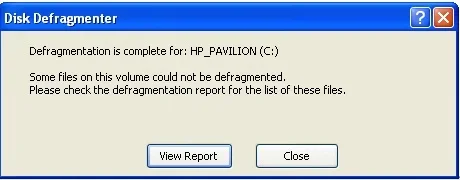
Ok switched off anti-virus and defragged drive. And yet again it jumped when half-way through defragging. This is the message box that then appears -
 

Attachments

  • defrag.webp
    defrag.webp
    9.1 KB · Views: 123
Last edited:
mos Yes its the Windows defragger. Will take screenshot of message next time it appears.
FI yes Ive constantly got the anti-virus software swithched on, will switch it off and re-defrag and see what happens.
Thanks for your help both of you. :)
Ok switched off anti-virus and defragged drive. And yet again it jumped when half-way through defragging. This is the message box that then appears -
What did the report itself say?
 
THanks for posting that pic EH - my first thought is again that you don't have enough free space on the drive to defrag certain parts of it.

I used to get the same message with my first laptop. The actual percentage free was enough to run the defragmenter, but there was no single free area large enough to deal with certain data clusters, and thus the drive never fully defragmented.

If that is indeed the case with you, I'd try to remove from non-essential data to back-up devices (multiple ones if it's precious data), if only temporarily, until you've managed to defrag the thing better. I gather you have a few PCs at your house, and sure you have access to CD/DVD burners and also maybe external hard drives, so that shouldn't be a problem.

A highly fragmented drive may be bogging down the speed of your PC, but there are numerous other factors as well.

- Have you downloaded one of the free programs to check to physical health of your hard disk?

- Do you run Disk Cleanup regularly too?

- I use Tune Up Utilities to regularly defrag the registry itself, remove unnecessary registry entries, and find any problems with my PC. I've been very happy with it, but had problems with some other similar utilities. PM me if you'd like more info!
(There should still be a trial version of it available at Download.com)

mos :)
 
Have you tried ScanDisk?
Microsoft Scandisk

I maintain my hard disk by doing this first and then proceeding to Disk Cleanup.
Microsoft Disk Cleanup

I also recommend removing all old System Restore points by clicking on the More Options tab on your Disk Cleanup utility. Press the Clean Up button on System Restore.
I do this all the time unless there had been serious problems recently.

I also use the freeware CCleaner to wipe all data tidbits and temp data and jv16 PowerTools to clean up registry.
AFAIK, jv16 PowerTools has been the safest when cleaning up the registry.

Of course, I remove all unnecessary data files from my HD to external media.

I like to keep my PC lean and mean!! 😌

Addendum: Have you checked for background processes with your Task Manager?
http://www.microsoft.com/resources/...ocs/en-us/taskman_whats_there_w.mspx?mfr=true
 
Sorry for delay, first of all thanks for your input Epigene, will try Microsoft scandisk when I can, have removed all the old system restore points, and normally clean up with Disc-cleaner every couple of days. Have also changed the start up menu and switched off 15 items that dont need to start up when this pc starts up. Will keep on trying and see what happens, may get there one day lol.
mos will PM you soon if Microsoft Scandisc does nothing, may need to clean up more of the hard drive than what Im currently doing.
FI the actual report says nothing at all, doesnt even list which files cant be defragged, it just comes up with the box above ok.
 
OK, I have one.

My external USB hard drive suddenly won't work any more. When I plug it into my computer, my computer suddenly slows down incredibly, but I can not access the drive.

What's going on? I want to run a virus check, but obviously this is beyond my current ability on this one...
 
Have you tried it on another machine? also do you have other usb devices that do work on the same port?

Many USB devices will fail with out warning, if your system slows down to a crawl this is a warning sign that the device may have malfunctioned.
 
OK, but how can I reformat it if my computer won't even assign it a drive letter?
 
Well, with my experience with USB drives, some have software pre-installed on them... If it won't assign a letter, it's probably done for...
 
Back
Top Bottom