


FinancialWar
Sempai
- 19 May 2006
- 1,065
- 44
my web browser (Google Chrome) even with encoding set to Japanese, can not seem to display some of the Japanese Kanji variants instead I get simplified Chinese Hanzi, even though in the drop down box shows Japanese.
for example
I type ぐたい, I get 具体 (Japanese 具 is not connected)
はいいろ>灰色 (灰 is not Japanese)
ちょく>直 (not Japanese)
うつわ>器 (犬 instead of 大)
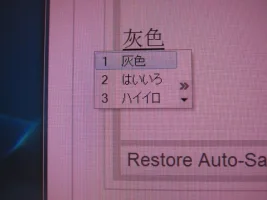
in other situations where there are the Kanji is different from it's corresponding Simplified Hanzi, the browser shows correct Kanji version and not the Simplified Hanzi.
あるく>歩く and not the Chinese 步
せんそう>戦争 and not the Chinese 战争
I tried on IE as well, same thing. Are you experiencing this issue?
for example
I type ぐたい, I get 具体 (Japanese 具 is not connected)
はいいろ>灰色 (灰 is not Japanese)
ちょく>直 (not Japanese)
うつわ>器 (犬 instead of 大)
in other situations where there are the Kanji is different from it's corresponding Simplified Hanzi, the browser shows correct Kanji version and not the Simplified Hanzi.
あるく>歩く and not the Chinese 步
せんそう>戦争 and not the Chinese 战争
I tried on IE as well, same thing. Are you experiencing this issue?
Last edited:


