


- 14 Mar 2002
- 21,050
- 18,904
Some of you may have spotted a few of Xenforo's new features, but there's a lot more under the hood. I will use this thread to introduce a few improvements over our previous software.
User tagging
As explained here. It is also possible to tag users in comments and profile posts.
New text editor
The new editor is based on Redactor. It is simple, responsive, AND works for IE users, too.
One very convenient feature is the drag and drop picture upload. Just select any pictures on your PC and drop them into the text box (see below). The number of images you can select for upload depends on your user group.
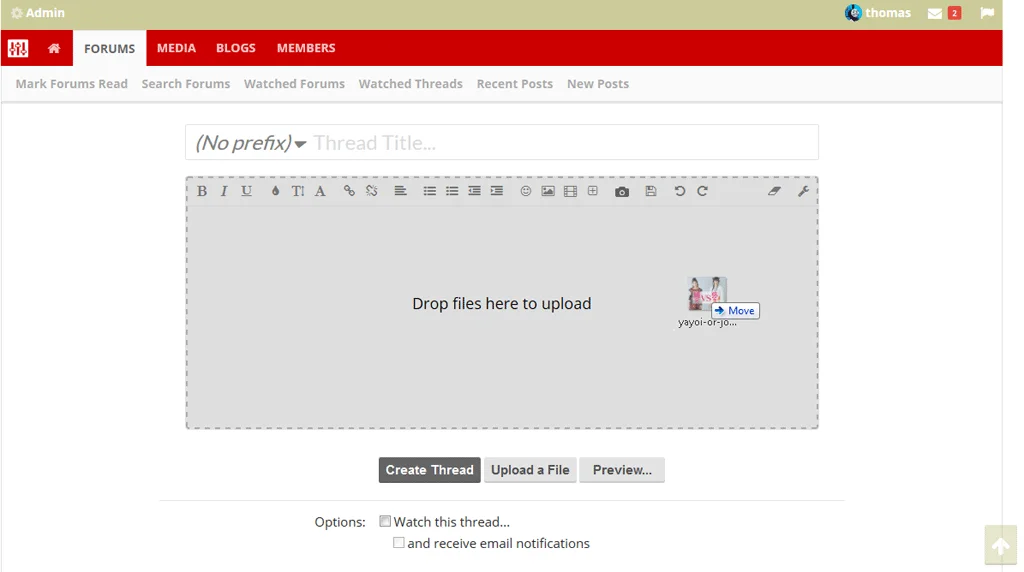
Of course, you will still be able to upload images the traditional way. You can either append the full image or just a thumbnail.
Videos will be automatically parsed just by inserting the video link, without having to add any tags.
Your drafts will be auto-saved every 60 seconds.
New reply options
When replying to a post you no longer have to quote the entire post and/or edit it. Just highlight the part you want to respond to and right click it (see below).
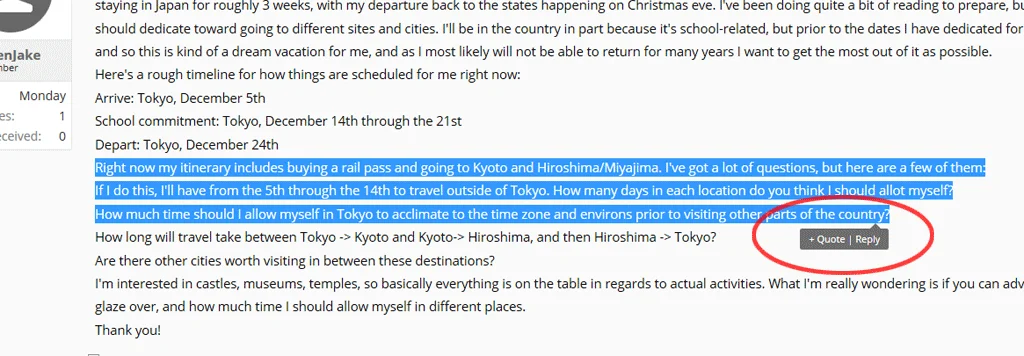
The multi-quote feature is extremely useful if you want to reply to different posts in one post. Just toggle the Quote button at the bottom right, then select "Insert Quotes" in the text field, et voilà!
More to follow soon.
User tagging
As explained here. It is also possible to tag users in comments and profile posts.
New text editor
The new editor is based on Redactor. It is simple, responsive, AND works for IE users, too.
One very convenient feature is the drag and drop picture upload. Just select any pictures on your PC and drop them into the text box (see below). The number of images you can select for upload depends on your user group.
Of course, you will still be able to upload images the traditional way. You can either append the full image or just a thumbnail.
Videos will be automatically parsed just by inserting the video link, without having to add any tags.
Your drafts will be auto-saved every 60 seconds.
New reply options
When replying to a post you no longer have to quote the entire post and/or edit it. Just highlight the part you want to respond to and right click it (see below).
The multi-quote feature is extremely useful if you want to reply to different posts in one post. Just toggle the Quote button at the bottom right, then select "Insert Quotes" in the text field, et voilà!
More to follow soon.


