- 12 Oct 2013
- 4,071
- 5,023
Hello All,
I often use the Glyphwiki site to find old or unusual variants of kanji. Lately I notice a lot of the kanji aren't displaying, and I get a red box with an x in it instead of the kanji (☒).
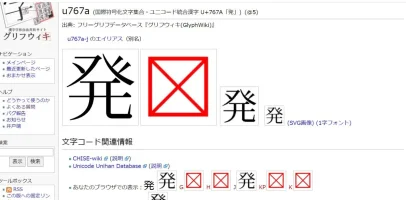
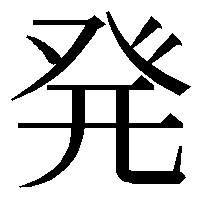
I cleared the cache, uninstalled Chrome and then re-installed it. All the settings should be correct. Anyone have a fix for this, or is it just one of those quirks I have to live with? As an example, on a recent thread there was a variant for 発 that I was trying to find, so when I go the glyphwiki page for 発 (u767a (発) - GlyphWiki) I should be able to see the various ways of writing 発, but many of them are replaced by the ☒ symbol as below.
Let me know if you have any ideas, or if you are seeing the same thing.
Edit: It happens in Edge too, but the "undisplayable" kanji aren't consistent between the two browsers. Some show up in Chrome, and don't show up in Edge, whereas Edge will be fine displaying certain variants, but will gag on others.
I often use the Glyphwiki site to find old or unusual variants of kanji. Lately I notice a lot of the kanji aren't displaying, and I get a red box with an x in it instead of the kanji (☒).
I cleared the cache, uninstalled Chrome and then re-installed it. All the settings should be correct. Anyone have a fix for this, or is it just one of those quirks I have to live with? As an example, on a recent thread there was a variant for 発 that I was trying to find, so when I go the glyphwiki page for 発 (u767a (発) - GlyphWiki) I should be able to see the various ways of writing 発, but many of them are replaced by the ☒ symbol as below.
Let me know if you have any ideas, or if you are seeing the same thing.
Edit: It happens in Edge too, but the "undisplayable" kanji aren't consistent between the two browsers. Some show up in Chrome, and don't show up in Edge, whereas Edge will be fine displaying certain variants, but will gag on others.