Digital camera recommendation

I search for new cameras there but it won't connect, just used cameras. But really I want to buy new. Thanks
Here's for new cameras. I searched for Canon in both cases.
 
Here's for new cameras. I searched for Canon in both cases.
OK, thanks.
Looking now but got to run. be back in 2 hours.
 
Thanks for looking, but can you find something with zoom. I can go up to 12000 yen today and I'd like to get something in the mail soon.
The one I posted actually has a 16x (digital) zoom. Of course optical zoom will give you better image quality.

I never thought shopping for a camera would be so hard and this is Japan.
You might want to go to a local electronics/camera store. They probably have a good selection of used cameras that might be better than buying a new one.
For example: Camera no Kitamura · 4 Chome-2-21 Yoshikinakahigashi, Yamaguchi, 753-0813, Japan
 
The one I posted actually has a 16x (digital) zoom. Of course optical zoom will give you better image quality.


You might want to go to a local electronics/camera store. They probably have a good selection of used cameras that might be better than buying a new one.
For example: Camera no Kitamura · 4 Chome-2-21 Yoshikinakahigashi, Yamaguchi, 753-0813, Japan
I can always count on you. That is only a few minutes away too. Tomorrow if no typhoon weather. Tonight just windy.
 
FYI, the websites I linked to were for the same company (Camera no Kitamura).

Given your budget, used is probably the way to go. That's what I would do.
OK, thanks.
It says they buy phones too. I got a flip flop and an Android ( glass is broke ) maybe I bring in and see what they can give me.
Yes, it looks like used is best.
The shop in Yamaguchi has great service reviews also. Tomorrow busy day, but if no typhoon weather I really hope to walk out with a camera. fingers crossed
 
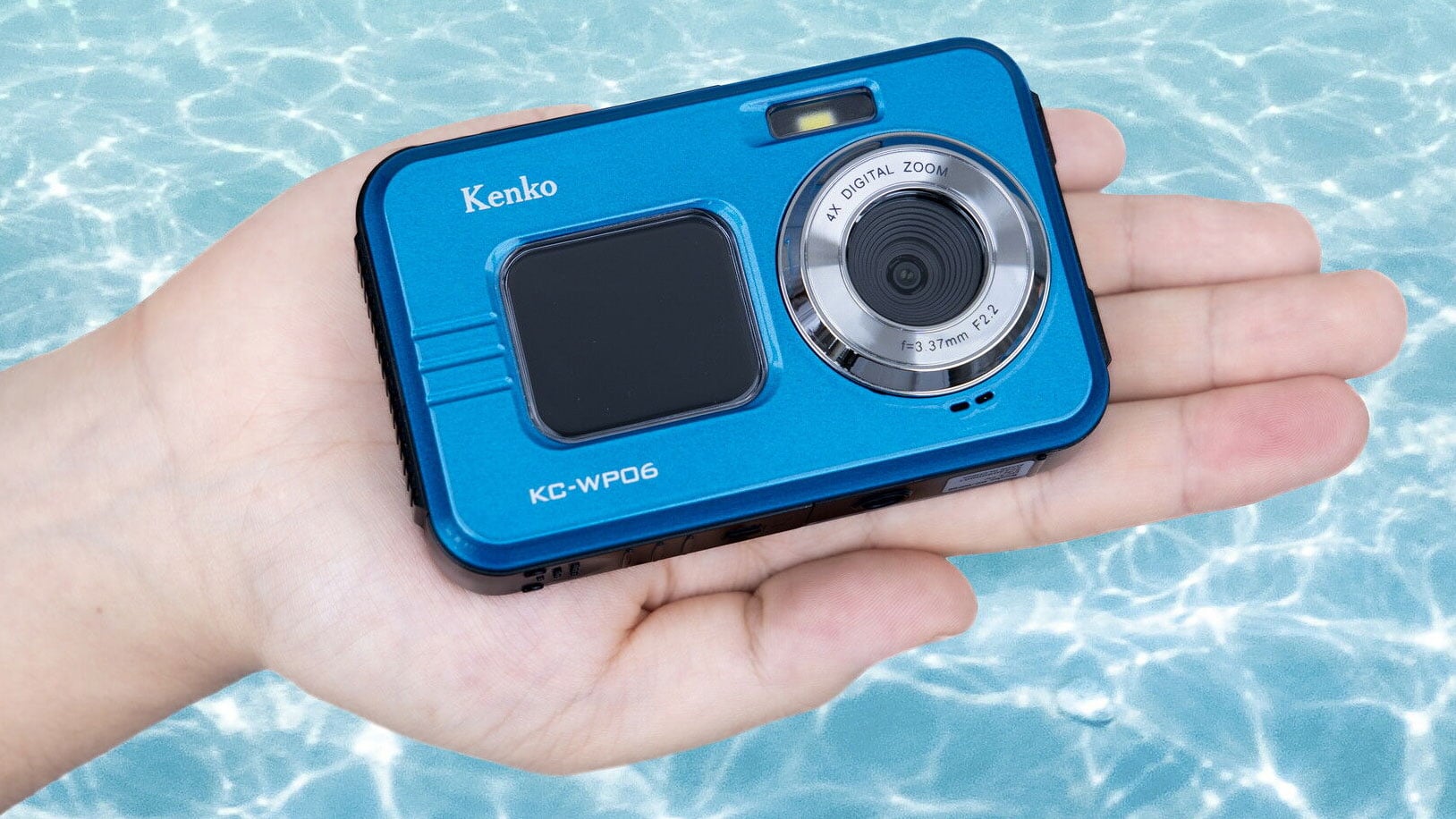
I'm at the camera store now looking at this camera but there's no sales people.
IMG_20230811_104551.webp


I don't think I'm the only customer walking out this is ridiculous.
Anyway I wanted to find out if the instructions on the camera can be an English otherwise it's not going to do me no good
Are any of you guys familiar with this at all.
 
Okay now I got to buy a mini SD card but I don't know if it takes a 64 GB or 32 GB I need to find that out before I buy it buy it
 
I hope I made the right decision by buying this camera but there is nothing available other than two cameras under 20,000 yen and this sales person is really kind so it really played a big importance whether I bought it or not it has a zoom on it I wouldn't say it's all that great but anyway it's a camera and hopefully it's what I need just basic stuff and maybe one day I'll outgrow it who knows but what I have in mind is really trying to put things together with put the pictures of my travel and do something with it
 
I hope I made the right decision by buying this camera but there is nothing available other than two cameras under 20,000 yen and this sales person is really kind so it really played a big importance whether I bought it or not it has a zoom on it I wouldn't say it's all that great but anyway it's a camera and hopefully it's what I need just basic stuff and maybe one day I'll outgrow it who knows but what I have in mind is really trying to put things together with put the pictures of my travel and do something with it
Sales person could help you out with the card but the Amazon description was 64-128MB.
 
So I can buy the 64 GB that's okay then right
Yes. Has to be Class 10 or greater. Sorry I was wrong though, it can take 4-128gb. But if it's greater than 64GB it must be speed class 10 or greater. Less than 64GB can be the slower chips.
 
Looks like this camera is newly released and domestic market only so I'm afraid the manual is only in Japanese as far as I can tell. But we can help you figure it out.
Here's the manual. https://www.kenko-tokina.co.jp/imaging/camera/mt-images/KC-WP06_manual_ver1_1.pdf
Since it's waterproof we expect you to get some beach/water/fish shots!

By the way it only comes with a USB cable. Probably you already have charger plugs but if not you may want to buy one. Or you can plug the camera into your PC to charge I guess.

1691726251647.webp
 
I'm looking for English. I found the user manual in Japanese, and I found a review in English here.

I'll check the instructions to see if they have an English setting for the displays.
Thanks I read the report on it. Its a basic camera and really I'm sure that is all I need.
It's new so there probably are no tutorials on youtube on it, also it is only available in Japan.
It can take 128 gb, but I just bought the 64 gb , should be fine with that.
 
Oops I wasn't paying attention. Mikawa already gave you the instructions link. Anyway it looks like it should do the trick.
 
That should do the trick. The "10" in the particle circle is the speed/class. So this one qualifies. And on top of that it's gluten free!
OK, one thing taken care of. Now off to 2 doctors. Knee doctor and the other one to see if there is any thing wrong with me. I don't mean mentally either, just the BIG C word. First test PSA was OK, so anyway I'll keep you informed.
 
OK, one thing taken care of. Now off to 2 doctors. Knee doctor and the other one to see if there is any thing wrong with me. I don't mean mentally either, just the BIG C word. First test PSA was OK, so anyway I'll keep you informed.
Back, I guess all doctors in town are on vacation till the 15 or even up to the 20th of the month. OK, time to figure out the camera now. Guess first thing is to learn to charge the battery.

IMG_20230811_163047.webp
 
Last edited:
I assume the battery has been installed? (Manual pp 22-23)

Charging the battery is on page 24 of the manual. One thing about the manuals in Japan I've always admired is that they have excellent pictures.
First, turn off the camera.
Insert the microUSB plug into the microUSB slot in the camera (refer to diagram on page 24).
Insert the USB plug into a USB wall charger (sold separately). Charger should be a type A output, 1 port 5V, greater than 2A capacity.
A red LED will light while the camera is charging. The LED will turn off when charging is complete.
 
Back
Top Bottom